TheBoatApp now speaks Italian, plus you can CHAT with your Boat!
Ahoy fellow sailors,
The clocks have gone back, the evenings are drawing in, and for many of you the winter work list is already pencilled onto the back of the chart table (...for us Northerners at least!). Ever tried to find your misplaced engine manual? Or hunted through the lockers for a spare impeller you are certain you bought, somewhere, once?
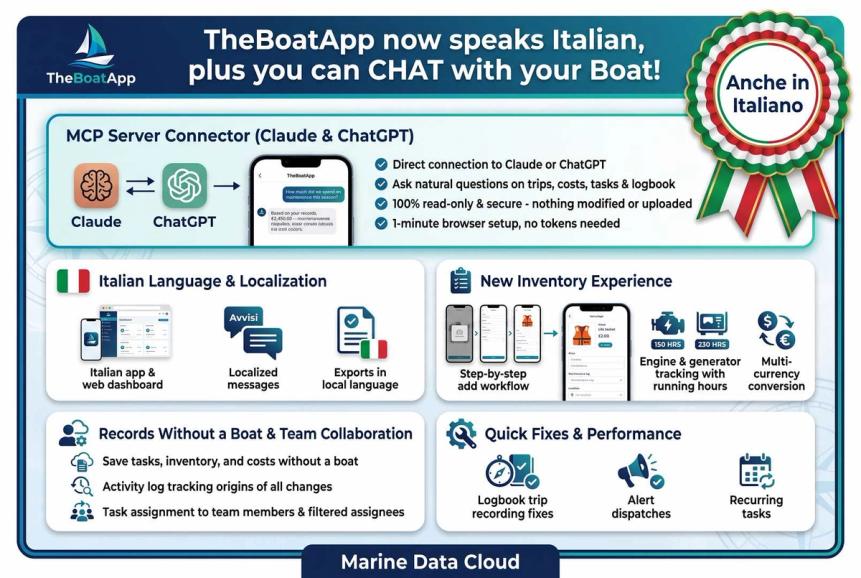
The digital shipyard has been busy again, and we have cast off the lines on a boatload of new features: TheBoatApp now speaks Italian (Si, anche in Italiano!), while you can also CHAT with your Boat! Here is what is new, by theme.
TheBoatApp Speaks Italian
Italian language: the mobile-app is now available in Italian. It follows your phone's language, and you can switch between English and Italian in Settings. The web-app speaks Italian too, with a language setting of its own.
Your language, all the way down: our server now replies in each user's language, including the wording of export notifications. Exports use headings in your language and open correctly in Excel, and those same exports can be imported again.
CHAT with your Boat!
MCP Server Connector: you can now connect TheBoatApp straight into your Claude or ChatGPT and simply ask about your boat, instead of digging through screens for it. Fancy knowing how much you spent on maintenance this season, or what's overdue before you haul out? Just ask - the assistant reads your trips, tasks, inventory, costs, logbook and alerts directly from your account, at the moment you ask, and only for what the question needs. Nothing is copied or uploaded anywhere, and it's strictly read-only: no task, cost or logbook entry can be changed through it, so your data stays exactly as shipshape as you left it.
Setup takes about a minute, no installing anything or fiddling with tokens - you sign in through your browser, same as any other site, and approve the connection. Full walk-throughs for both Claude and ChatGPT are in the online MCP Server docs.
A Full Refit for Your Inventory
Add items, step by step: on mobile, a new guided flow takes you through type, details, specs, purchase, reminders, maintenance, then files and review. A progress header, Skip and Back/Continue buttons, and a shortcut to add the item right away keep you moving. On the web dashboard, a new multistep drawer will not move on until the required fields are filled and the maintenance tasks are complete, and a quick-add modal is there for the days you are in a hurry. The Add item button is now a split button that remembers which form you used last.
A home for every item: each inventory item now has its own screen on mobile and its own page on the web. Mobile shows its photo, costs, maintenance tasks and readings, and you can rename and edit the item right there. The web page has cards for key facts, specs, purchase, notes, files, reminders, maintenance, usage log and costs, and you can edit each field in place. An item's photo becomes its cover image.
Engines and generators: track them as inventory items, including their running hours on mobile. On the web dashboard they skip the stock and dimensions fields, since a diesel engine is not exactly a box of shackles.
Stock moves and usage readings: on the web dashboard you can now record both straight from an item's page, so the numbers stay as fresh as the bilge is dry.
Maintenance, built in: add maintenance tasks while you create an item, and mark them as done from the item itself. On the web dashboard, maintenance tasks can also carry instructions, adding one is simpler, and you pick its priority with segment buttons.
Purchase prices in your base currency: inventory purchase prices are converted at the rate on the purchase date. If you enter a rate by hand, we keep it.
No Boat? No Problem
Records without a boat: tasks, inventory items and costs can now be saved without a boat, and on the web dashboard so can logs. Lists can show and filter the records that have no boat, so the spares sitting in your garage or the shopping list for the boat you have not yet bought are no longer left on the dock.
The Right Task for the Right Crew Member
Assign and filter: assign a task to any member of your organisation and filter tasks by who they are assigned to, on both mobile and the web dashboard.
Alerts that find the right person: alerts go to the task's creator, its assignees, the owner and anyone on the "also notify" list. Due alerts, low-stock alerts and usage-threshold alerts are being sent again, and recurring tasks restart on schedule. Finishing or cancelling a task now stops its alerts, so nobody gets nagged about a job already done.
Numbers that match: task counts on the dashboard and in task lists all use the same rule for what counts as "open", so the figures agree wherever you look.
A Clearer View of Pricing, Plans and Features-list
A fresh pricing page: redesigned plan cards, an Enterprise bar and a single comparison table make the plans easier to compare. Signed-in visitors also get a link to the dashboard right on the plan cards.
Shipshape Under the Waterline
Plenty of boat chores and then some: page header actions on the web dashboard now live in a "More" menu, the current-reading panel and the item photo have a cleaner design, inventory search results show the location name, and the supplier URL must be a full web address, with stray spaces removed. We also fixed a good number of snags: the trip menu keeps working after you close a trip's details sheet, trips no longer show "Recording" forever, hidden sheets no longer tint the screen behind them, stock and usage changes work for items with no boat, edits to tasks save correctly, and records can now leave a boat, with a deleted boat cleaning up whatever was still attached to it.
A tonne of work has also been done on other features, updates and fixes. You may always see everything that is released in the public Changelog.
Closing, I wish you well, with as many miles as you wish under your keel, good health and safe cruising, with an always seaworthy boat!
Best Marine Regards,
George & TheBoatApp Crew